Netfix on smart TV and network bandwidth

Status
Not open for further replies.
Joined
Mar 21, 2004
Messages
33,694
Location
Near the beach in Delaware
Does Netflix use all the network bandwidth it finds to send the best picture possible? I have FIOS at 60Mb and with Netflix streaming I get a partially garbled VOIP phone call.

Maybe it's trying to send a UHD picture?
 
It is the router's job to guarantee quality of service of each user / device, not the individual device. There should be a QoS setting in your router to reserve certain amount of bandwidth for each protocol / port number / etc.
 
Your router permitting, Netflix will use all your available bandwidth to prebuffer/read ahead. So, for example, it might pull 60 Mbps for 5 seconds, and then pull nothing for the next 10 seconds.

If your router has a bandwidth limiter, set that up.
 
Netflix has a good internet connection test website and they will tell you what quality video streams at what internet connection rate. I don't need to check either to tell you that your pipe is good for 4K via Netflix, maybe even 8K video. 10 Mbps is good for 1080p HDTV, 5 Mbps is good for 720p HDTV. All of those guidelines allow for some wiggle room without harming the video stream. So something must be going on with your connection; 60 Mbps is enough to run a server.

go to: www fast dotcom

... to access Netflix's Speed Test.

NEVER trust your ISP's speed test; they can give your pipe priority during the test to give unrealistically high throughput.

I will give you an example:

I have a 10 Mbps down / 960 Mbps up pipe.

While streaming NFL Network and an NFL preseason game (Houston vs Kansas City, Week 1) on my TV at 1080p over the internet (ROKU), typing this post via my browser and with my mail app running and checking for mail every 5 minutes, I get 7 Mbps down 800 Mbps up via that test going from my home in Canada to Seattle WA and back (about 2400 miles round trip). If I turned everything off except my browser and the test I will get a bit more than my paid-for speeds.

Your pipe is (supposed to be) SIX TIMES fatter than mine.

 
Netflix isn't going to 'push' a UHD stream to you unless you pay for that tier. With UHD, in case you had it, they recommend 25 Mb/s service at a minimum and even then, it's still variable. Will they use up ALL of your 60 Mb/s bandwidth ? Not likely at all.

Some streaming devices will display the bandwidth being used in real-time or pretty close to it. The number goes up and down constantly. You can do the same from a computer although I don't remember the steps that enable it.
 
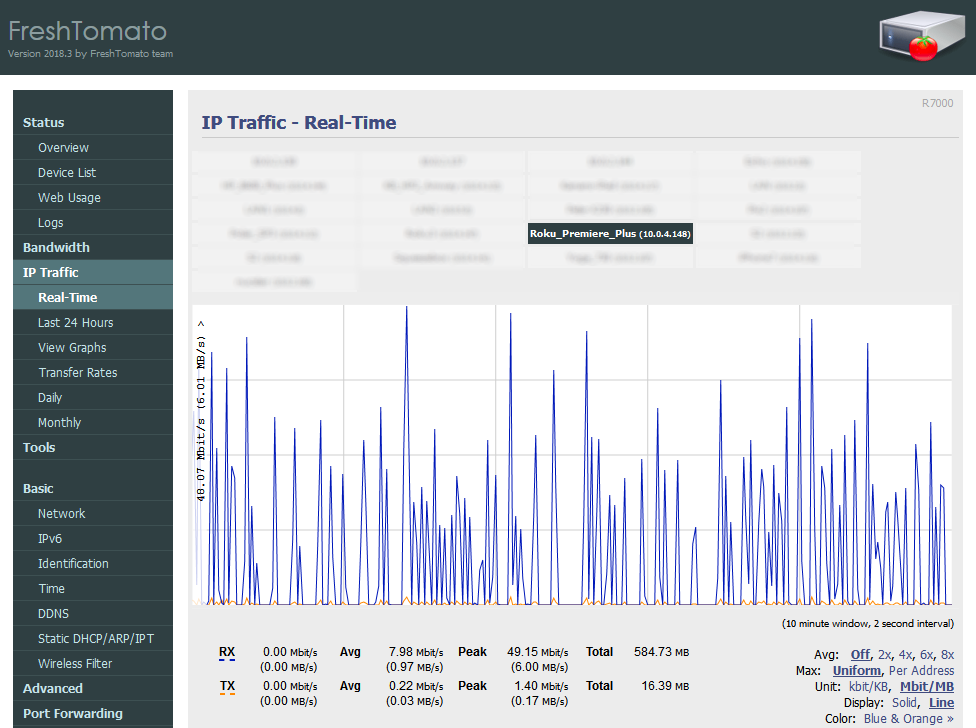
I posted this in another thread. This is my Roku streaming Amazon Prime Video, but Netflix is not much different. I have a 50 Mbps link, and as you can see, it spikes up to that, but averages around 8-10 Mbps overall. This is an HD stream.

43715585912_760a93e1ae_o.png
 
Originally Posted By: dishdude
I thought most VOIP modules went before the router so phone calls always have priority.

It depends on if the voip service is provided by your internet company or by a third party like Ooma.
 
Should be able to either restrict netflix to a lower priority or have it reserve some bandwidth.. ie not let one device use it all.

Alternatively you perhaps can prioritize voip. although IRL sometimes that does not work that great.

I know when I used to competitively game.. that any HD streaming would doom me to mediocrity despite having a relatively huge amount of bandwidth.. (5-10x the "required" amount for streaming) and having the gaming set to top priority QoS on the router.

What voip service/hardware are you using?
 
Is VOIP and snart TV using a WiFi connection? If yes your router may not be up to task. Ethernet cables solve so many issues like this if possible.

60 Mbps is great bandwidth to support Netflix and VOIP. I think Netflix UHD if paying for thatplan requires 25 Mbps and your content is actually UHD being streamed. Normal HD stuff is only about 5-10 Mbps.

What kind of router is handling this?
 
Quote:
I have a 10 Mbps down / 960 Mbps up pipe.

What?? Do you use different definition of down and up than rest of us? 960 Mbps?
 
My router data looks like QP's. The (hardwired via cat 5) Blu-Ray player takes about half my bandwidth, pulse-width-modulated in 30-second bursts.
 
Originally Posted By: Vikas
Quote:
I have a 10 Mbps down / 960 Mbps up pipe.

What?? Do you use different definition of down and up than rest of us? 960 Mbps?


Sheer guess 10 Mbps down/960 kbps up which is abysmal at best.
 
Originally Posted By: madRiver


Sheer guess 10 Mbps down/960 kbps up which is abysmal at best.
Abysmal? It's fine for most tasks, including an HD stream.
 
Status
Not open for further replies.
Back
Top Bottom