Just a heads up since there seems to be a lot of love for Linux Mint around here. Linux Mint 17 was released today, for those not familiar with LM this is a long term support release that will be supported through 2019. I just installed the Mate version and see a few changes from 16, mainly with the shutdown menu - looks good!

You are using an out of date browser. It may not display this or other websites correctly.
You should upgrade or use an alternative browser.
You should upgrade or use an alternative browser.
Linux Mint 17 is Out!
- Thread starter dishdude
- Start date
- Status
- Not open for further replies.
Nice.
How does it operate on old hardware?
I installed Ubuntu 14.04 in my old Compaq: Athlon XP 3000+, 2GB RAM, Nvidia 6600GT...it doesn't run very smoothly, and Flash is not even present due to the Athlon XP not having SSE2.
It works a little better in a similar computer with a Sempron (which does have SSE2).
I installed Ubuntu 14.04 in my old Compaq: Athlon XP 3000+, 2GB RAM, Nvidia 6600GT...it doesn't run very smoothly, and Flash is not even present due to the Athlon XP not having SSE2.
It works a little better in a similar computer with a Sempron (which does have SSE2).

Originally Posted By: RoGuE
How does it operate on old hardware?
I installed Ubuntu 14.04 in my old Compaq: Athlon XP 3000+, 2GB RAM, Nvidia 6600GT...it doesn't run very smoothly, and Flash is not even present due to the Athlon XP not having SSE2.
It works a little better in a similar computer with a Sempron (which does have SSE2).
I have an old Dell Dimension 3100 with 2GB Ram and it is working perfectly with Mint 17. I installed the Beta version a few days ago. I was running Mint 16 on the same machine.
How does it operate on old hardware?
I installed Ubuntu 14.04 in my old Compaq: Athlon XP 3000+, 2GB RAM, Nvidia 6600GT...it doesn't run very smoothly, and Flash is not even present due to the Athlon XP not having SSE2.
It works a little better in a similar computer with a Sempron (which does have SSE2).
I have an old Dell Dimension 3100 with 2GB Ram and it is working perfectly with Mint 17. I installed the Beta version a few days ago. I was running Mint 16 on the same machine.
Originally Posted By: JerryBob
If they would make Quicken for Linux, I'd ditch Windows for good. I know wine is an option, but I've heard Quicken is buggy on wine.
Otherwise, why on earth would someone want to run Windows?
I ran Quicken 10 with Wine in Mint 16, it worked but was buggy as you mentioned. I since switched over to KMYMoney transferred my data from Quicken 10 and said goodbye to Quicken. Next time I have issues with my laptop I will be ditching Win 7, and it will be so long to MSFT as well.
If they would make Quicken for Linux, I'd ditch Windows for good. I know wine is an option, but I've heard Quicken is buggy on wine.
Otherwise, why on earth would someone want to run Windows?
I ran Quicken 10 with Wine in Mint 16, it worked but was buggy as you mentioned. I since switched over to KMYMoney transferred my data from Quicken 10 and said goodbye to Quicken. Next time I have issues with my laptop I will be ditching Win 7, and it will be so long to MSFT as well.

Only the RC is out yet - Not the final version yet.
That being said, I've been using the RC for a few days now and it's great!
That being said, I've been using the RC for a few days now and it's great!
Originally Posted By: hatt
Linux noob question. What's the best way to update?
Until the final release is out, I'm not sure if you can do anything other than a clean install of Mint 17 RC.
Linux noob question. What's the best way to update?
Until the final release is out, I'm not sure if you can do anything other than a clean install of Mint 17 RC.

Originally Posted By: RoGuE
How does it operate on old hardware?
The MATE edition uses a desktop environment (MATE) that will be much, much friendlier to older hardware than the Cinnamon edition.
How does it operate on old hardware?
The MATE edition uses a desktop environment (MATE) that will be much, much friendlier to older hardware than the Cinnamon edition.
Originally Posted By: hatt
Linux noob question. What's the best way to update?
Let the update manager tell you there is an update, and let it do its thing! The desktop user-friendly distributions all feature an update manager that'll do everything for you automagically.
Linux noob question. What's the best way to update?
Let the update manager tell you there is an update, and let it do its thing! The desktop user-friendly distributions all feature an update manager that'll do everything for you automagically.
Originally Posted By: JerryBob
If they would make Quicken for Linux, I'd ditch Windows for good. I know wine is an option, but I've heard Quicken is buggy on wine.
Otherwise, why on earth would someone want to run Windows?
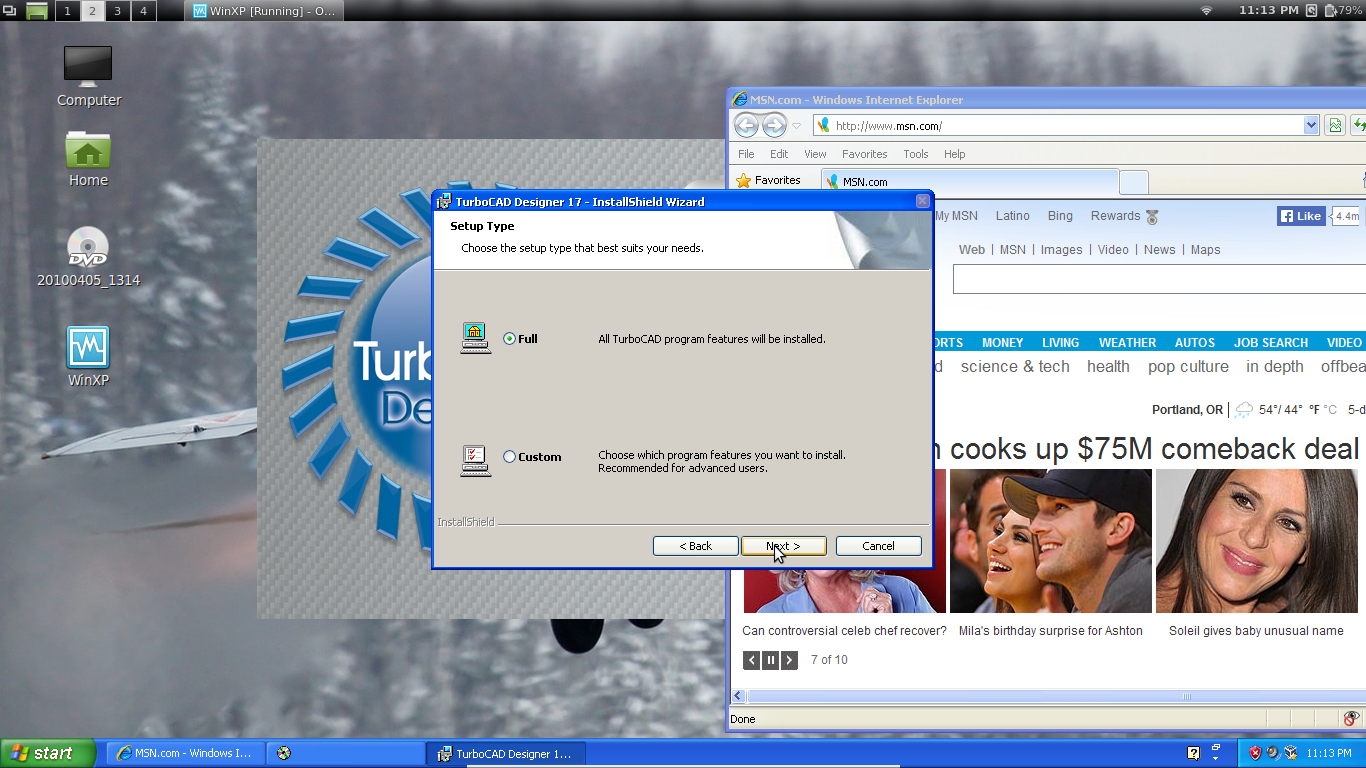
To answer the above question, there is certain not all that frequently used but invaluable software that just doesn't seem to exist yet for linux; for me, it's TurboCad, and tax software (HR Block and TurboTax).
Rather than whine or dual boot, I'm running XP under VirtualBox. I got that xp license installed just before the 2014 deadline for MS support to run out for xp.
http://www.bobistheoilguy.com/forums/ub...g_u#Post3281384
It works great and you can switch as desired from full screen to seamless mode. Although it seems to generally slow down performance by ~70% it beats dual booting for convenience, and the performance hit for non native apps is generally fine for most modern computers. (My current laptop is a few years old and does just fine with its 1.5 GHz quad core AMD A6 processor.)
If they would make Quicken for Linux, I'd ditch Windows for good. I know wine is an option, but I've heard Quicken is buggy on wine.
Otherwise, why on earth would someone want to run Windows?
To answer the above question, there is certain not all that frequently used but invaluable software that just doesn't seem to exist yet for linux; for me, it's TurboCad, and tax software (HR Block and TurboTax).
Rather than whine or dual boot, I'm running XP under VirtualBox. I got that xp license installed just before the 2014 deadline for MS support to run out for xp.
http://www.bobistheoilguy.com/forums/ub...g_u#Post3281384
It works great and you can switch as desired from full screen to seamless mode. Although it seems to generally slow down performance by ~70% it beats dual booting for convenience, and the performance hit for non native apps is generally fine for most modern computers. (My current laptop is a few years old and does just fine with its 1.5 GHz quad core AMD A6 processor.)
Originally Posted By: JerryBob
If they would make Quicken for Linux, I'd ditch Windows for good. I know wine is an option, but I've heard Quicken is buggy on wine.
Otherwise, why on earth would someone want to run Windows?
Here is WINE's info about Quicken: https://appdb.winehq.org/objectManager.php?sClass=application&iId=107
If they would make Quicken for Linux, I'd ditch Windows for good. I know wine is an option, but I've heard Quicken is buggy on wine.
Otherwise, why on earth would someone want to run Windows?
Here is WINE's info about Quicken: https://appdb.winehq.org/objectManager.php?sClass=application&iId=107
Originally Posted By: uc50ic4more
Originally Posted By: hatt
Linux noob question. What's the best way to update?
Let the update manager tell you there is an update, and let it do its thing! The desktop user-friendly distributions all feature an update manager that'll do everything for you automagically.
But that doesn't help the pain of knowing a newer software version is out there and I don't have it.

I guess this will boil down to whether I get a little time to mess around between now and when the official release is out.
Originally Posted By: hatt
Linux noob question. What's the best way to update?
Let the update manager tell you there is an update, and let it do its thing! The desktop user-friendly distributions all feature an update manager that'll do everything for you automagically.
But that doesn't help the pain of knowing a newer software version is out there and I don't have it.
I guess this will boil down to whether I get a little time to mess around between now and when the official release is out.
Originally Posted By: hatt
But that doesn't help the pain of knowing a newer software version is out there and I don't have it.
When one uses Ubuntu or its derivatives, the fact that the Ubuntu developers test the software out for a while before adding it to the repositories is a big, big selling point. If you want new stuff as soon as possible after it is released, Arch Linux is for you. There is also Debian's "Unstable" branch and Fedora's "Rawhide" branch if you really want to dwell on the bleeding edge and have the latest of everything. Linux-based OS's offer you so much choice!
But that doesn't help the pain of knowing a newer software version is out there and I don't have it.
When one uses Ubuntu or its derivatives, the fact that the Ubuntu developers test the software out for a while before adding it to the repositories is a big, big selling point. If you want new stuff as soon as possible after it is released, Arch Linux is for you. There is also Debian's "Unstable" branch and Fedora's "Rawhide" branch if you really want to dwell on the bleeding edge and have the latest of everything. Linux-based OS's offer you so much choice!
Originally Posted By: hatt
Yeah I'm a Linux noob. I'll probably stick with the more pedestrian stuff. Although breaking things has always been the best way for me to learn.
When you never have to activate or license your software, break a-way! Heck, install Ubuntu or Mint and use that for your life's computing work but install other distros in a virtual machine to play, test and learn - You have nothing to lose.
Yeah I'm a Linux noob. I'll probably stick with the more pedestrian stuff. Although breaking things has always been the best way for me to learn.
When you never have to activate or license your software, break a-way! Heck, install Ubuntu or Mint and use that for your life's computing work but install other distros in a virtual machine to play, test and learn - You have nothing to lose.
Or learn how to use tar, and then nothing will ever go wrong, no matter how insane the experiment might be.

I'm loving it on my desktop PC, my next step is to upgrade my wife's PC. I remember having a problem with the Cisco AE2500 Wireless USB adapter working. W/O a good friend walking me through I'd be dead in the water. I have a feeling I'm going to have the same problem getting it to work again. I have held off as a result until I have the time to really dig in and fool with it.
Originally Posted By: demarpaint
I have a feeling I'm going to have the same problem getting it to work again.
Yup. This looks like a considerable pain in the behind:
http://www.grailbox.com/2012/05/installing-cisco-linksys-ae2500-wireless-adapter-in-linux/
I have a feeling I'm going to have the same problem getting it to work again.
Yup. This looks like a considerable pain in the behind:
http://www.grailbox.com/2012/05/installing-cisco-linksys-ae2500-wireless-adapter-in-linux/
- Status
- Not open for further replies.
Similar threads
- Replies
- 1
- Views
- 817

- Replies
- 21
- Views
- 2K